
The 2025 Parent’s Guide to Safety Apps

Compare features, spot gaps, and choose the right digital lifeline.
Try Guardely Free

Best safety app for parents

Why “Best Safety App for Parents” is an evergreen search
83 % of U.S. parents
now use at least one digital tool to track, check-in, or monitor their kids’ whereabouts (Pew Research, 2025).
Location dots alone
aren’t enough—parents want contextual data like nearby crime incidents, school alerts, and privacy guarantees.
App stores teem
with listicles, but few compare exact feature sets or transparency practices.

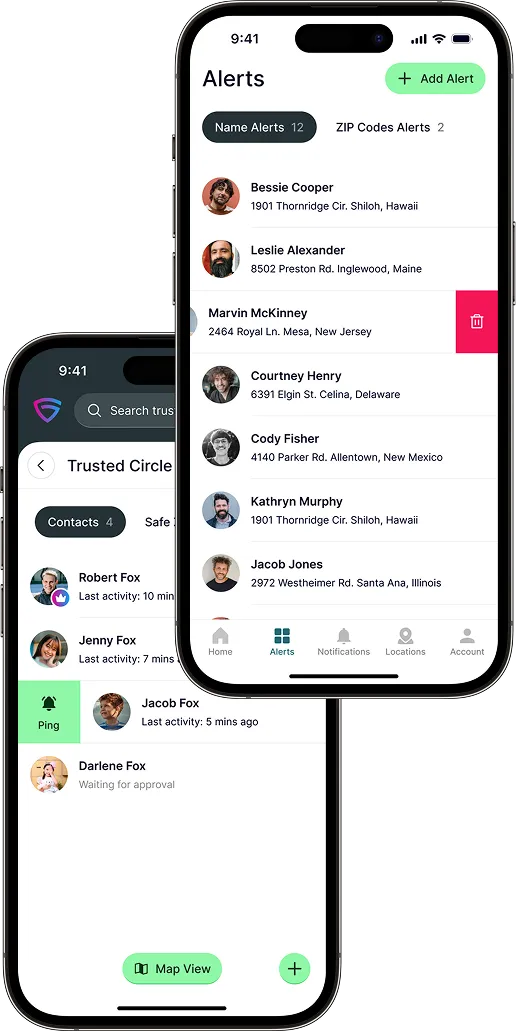
This guide cuts through marketing fluff with a comparison table, evaluation checklist, and internal links to deeper Guardely resources (e.g., Personal Safety App, Neighborhood Safety Report, Night-Shift Safety).
Quick-reference comparison table

Check each provider’s Pricing section for up-to-date plan details—features may vary by tier.
Features
Live Crime / Offender Data Crime-point pins (U.S.-only) Limited partner feed
Real-Time Alerts by Radius Violence & proximity Violence & proximity Web threats focus SOS only
Automatic Check-Ins Custom schedule Drive arrival
Privacy-First / No Data Brokers Past broker controversy Unclear Apple
Silent Panic / SOS Discreet + audio Audible alarm Self-harm alerts Loud SOS
Multi-Platform (watch, web) iOS, Android,watch iOS, Android iOS, Android iOS, Android Apple-only
Pricing Transparency See Pricing section Subscription tiers Subscription tiers Freemium + SOS Device ecosystem
Free Trial Reverse free trial N/A

How to evaluate a safety app: 5 core pillars

“Contextual Awareness
Dots on a map are passive. Look for crime-aware alerts, school-zone pings, or offender-radius warnings.
Granular Privacy Controls
Can your teen mask exact location to friends but share with you? Is data sold to advertisers?
Offline Alerts & Logs
Dots on a map are passive. Look for crime-aware alerts, school-zone pings, or offender-radius warnings.
Battery Efficiency & Offline Modes
Check app-store reviews for drain complaints and ensure SMS fallback when data drops.
Transparent Data Sources & Compliance
Public-record crime feeds (Guardely), encrypted storage, and HIPAA-conscious design for any health-adjacent info.

Free download: Parent safety-app checklist

Opt-in form appears after you click Try Guardely Free. PDF includes:

  • 20-point feature checklist (with “must” vs. “nice-to-have” columns)
  • “Conversation starters” to set digital-safety boundaries with kids
  • Printable contact card for teachers, coaches, and babysitters
  • QR links to internal resources:

Success stories from real parents

Take a look at what our users are saying about us!
Our buyers asked ‘Why’s the price so good?’ The Guardely ZIP report showed theft, not violent crime—deal closed.
María G., Realtor
Needed numbers for a ‘Ridgewood vs. Midtown’ article. Guardely’s CSV saved two days of FOIA emails.
Keisha P., Data Journalist
Printed the PDF for my lender; appraisal sailed through because the comps now had context.
Brian L., First-Time Home Buyer
Our buyers asked ‘Why’s the price so good?’ The Guardely ZIP report showed theft, not violent crime—deal closed.
María G., Realtor
Needed numbers for a ‘Ridgewood vs. Midtown’ article. Guardely’s CSV saved two days of FOIA emails.
Keisha P., Data Journalist
Printed the PDF for my lender; appraisal sailed through because the comps now had context.
Brian L., First-Time Home Buyer

Frequently asked questions

The most frequently asked questions and their answers
Does Guardely track my children constantly?
Guardely uses permission-based, always-visible location sharing that parents and teens can pause, time-limit, or restrict to specific trusted adults, so it works like a safety net rather than permanent surveillance.​

Families can agree on “on” windows—like late-night commutes or new routes—so everyone knows when live sharing is active and why.

Can I pair multiple apps?
Many families run Guardely alongside tools like Life360, Bark, or Find My to cover different needs such as driving behavior, web safety, and contextual crime alerts.​

The guide and downloadable checklist are designed to help you choose a mix that covers core safety pillars without overwhelming your child’s device.​

Where do I compare plan tiers?
For Guardely, the latest plans, trials, and inclusions are listed in the main site’s pricing section and in the App Store and Google Play listings.​

For other providers in the comparison table, it is best to review each official pricing page, since features like SOS, monitoring, or extra devices often sit behind specific tiers.​

⁠How do I talk to my teen about using a safety app?
Framing Guardely as a way to get help faster—not to “catch” them—makes teens more willing to participate and use features like check-ins and SOS.​

The checklist’s conversation prompts can guide you through agreeing on when sharing is on, what counts as an emergency, and how you will respond to alerts.

What happens if my child’s phone loses signal or dies?
When a device drops offline, Guardely preserves the last known location and recent journey path so you still have context on where they were headed.​

Simple household rules—like charging before late outings and using battery-saving modes—can further reduce gaps during important trips.​

⁠Can my child control who sees their location?
Each profile can specify which trusted adults see live location, who only receives danger broadcasts, and who just gets occasional check-ins.​

Setting these permissions together helps your child understand what is shared and builds trust around using the app.​

⁠Is Guardely only for teenagers?
Guardely supports a range of scenarios: younger kids walking to school, teens with late shifts, college students in new cities, and even older relatives who want a simple safety net.​

The same pillars—context-rich alerts, check-ins, and privacy controls—apply across ages, with settings tuned to independence level.

⁠Will using Guardely invade my child’s privacy?
Guardely emphasizes consent and clarity, with visible indicators when sharing is active and straightforward controls to pause or time-box location access.​

Parents are encouraged to use the tool alongside clear agreements, so digital safeguards complement, rather than replace, trust and communication.​

Does Guardely work if my child travels without me?
As your child moves through different neighborhoods or cities, Guardely continues to monitor risk and send alerts as long as the app has permission and a connection.​

Caregivers can still view check-ins, journey timelines, and danger broadcasts, which is especially useful for school trips, sports travel, and shared-custody schedules.

How quickly can I get started?
Most families can get set up in under ten minutes by installing the app, creating profiles, and inviting trusted contacts.​

Default settings provide a safe baseline from day one, and you can fine-tune alert sensitivity, sharing rules, and check-in preferences over the first few days.​

Ready to turn concern into confidence?

Download the checklist, test every feature for 30 days, and decide which pillars your family needs most.