Guardely for Elderly Safety

The elderly safety-check app that keeps mom & dad connected without feeling watched.
Set Up Mom’s Check-Ins

Elderly safety check-in app

Why adult children search “Elderly Safety Check-In App” every day
36 million falls
are reported among U.S. adults 65+ each year, causing over 3 million ER visits (CDC 2024).
28 % of seniors
live alone, yet 72% say they don’t want intrusive cameras or constant calls (AARP Home & Community Survey 2023).
Most “aging-in-place”
tech focuses on medical devices—great inside the house, useless when mom is at the grocery store or walking the dog.

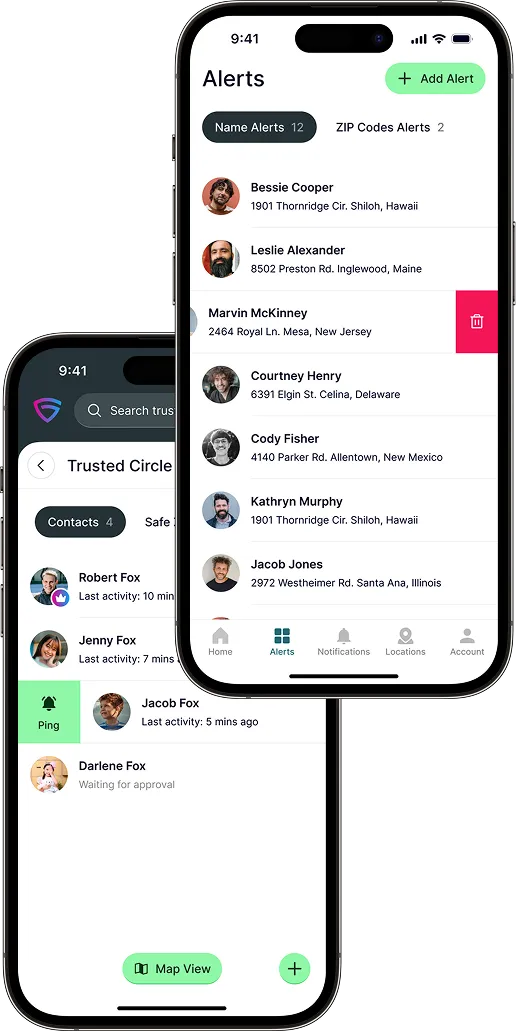
Guardely bridges the gap with an auto-scheduled safety-check system that pings Mom or Dad through their phone (and optional Apple Watch) at agreed intervals, shares an “All Good” to the family chat, and silently escalates if there’s no response—while keeping every byte of health-adjacent data HIPAA-conscious and never monetized.

Coverage note: Guardely’s live crime/offender feed is U.S.-only. When parents travel abroad, auto check-ins and location sharing still work; crime alerts resume on U.S. soil.
At-a-glance benefits for caring families

Explore the top features that enhance the experience for elders
Auto Check-In Schedule
  • Choose hour blocks (e.g., 8 a.m., noon, 8 p.m.) or custom cadence
  • Confirms “I’m OK” without being a nag
Escalation Ladder
  • Missed check-in → gentle reminder → family alert → 911 prompt
  • Rapid awareness if something’s wrong
Fall-Risk Insights
  • Weekly digest merges CDC fall stats with parent’s mobility data
  • Adds objective context to future care talks
Location Snapshot, Not 24/7 Tracking
  • Shares point-in-time location only at check-in
  • Respects autonomy — no constant dot on a map
Silent Panic Tap
  • One press sends location + 10-sec audio to trusted circle
  • Discreet help button for unexpected events
HIPAA-Conscious Design
  • Data encrypted, stored in U S.; no sales or ads
  • Aligns with healthcare-privacy standards
Printable Senior Guide
  • 1-page large-text sheet: “How to Answer Check-In”
  • Ease of adoption for non-tech parents

Let’s get started

Use our product to secure your elder parents.
Set Up Mom’s Check-Ins

How auto check-ins work (in 30 seconds)

Pick the Schedule

– Morning “Good Day,” midday “Doing Fine,” evening “Home Safe.”

Set the Response Window

Parent taps OK or says “All good” to voice prompt within 5 minutes.

Choose Escalation Contacts

Up to five family members get alerts if response is missed.

Enable Gentle Reminders

App vibrates after 2 minutes; watch buzzes if phone un-answered.

Relax

All good? Everyone sees a green check mark. Lost phone? Escalation kicks in automatically.

Fall-risk stats — because data drives
better conversations

1 in 4 adults 65+ falls each year
Most falls go unreported; proactive checks catch early warning signs.
95 % of hip fractures result from falls
Timely alerts shorten “floor time,” improving outcomes.
50 % of seniors who fall can’t get up without help
Guardely’s missed-check alert closes the gap between incident and assistance.
Weekly digest emails merge national fall-risk data with Mom’s recent missed checks or slow responses, giving families tangible insights to discuss with healthcare providers.

Location snapshot —enough insight, zero snooping

  • Point-in-time only: The app sends a single coordinate when Mom taps “I’m OK,” not a breadcrumb trail.
  • Radius masking: Share city-level location if parent prefers extra privacy.
  • Data retention: Geocoordinates auto-purge after 30 days unless a safety incident occurs.

HIPAA-conscious, privacy-first foundation


Guardely is not a covered entity, but we built storage and access controls to reflect HIPAA best practices, easing conversations with doctors and home-health aides.
End-to-End Encryption (AES-256)
protects every check-in and location ping.
U S. Data Residency
servers stay stateside, aligned with healthcare-data guidelines.
No Third-Party Ads, No Data Brokers
monetization comes only from subscriptions.
Consent-Driven Sharing
parents approve each contact before any data leaves the device.

Real families, real peace of mind

Take a look at what our users are saying about us!
Our buyers asked ‘Why’s the price so good?’ The Guardely ZIP report showed theft, not violent crime—deal closed.
María G., Realtor
Needed numbers for a ‘Ridgewood vs. Midtown’ article. Guardely’s CSV saved two days of FOIA emails.
Keisha P., Data Journalist
Printed the PDF for my lender; appraisal sailed through because the comps now had context.
Brian L., First-Time Home Buyer
Our buyers asked ‘Why’s the price so good?’ The Guardely ZIP report showed theft, not violent crime—deal closed.
María G., Realtor
Needed numbers for a ‘Ridgewood vs. Midtown’ article. Guardely’s CSV saved two days of FOIA emails.
Keisha P., Data Journalist
Printed the PDF for my lender; appraisal sailed through because the comps now had context.
Brian L., First-Time Home Buyer

Quick safety tips
for aging-in-place

  • Bright-path lighting from bedroom to bathroom cuts fall risk 12 %
  • Non-slip socks on slick floors reduce slips by 30 %.
  • Weekly medication review with a pharmacist lowers dizziness incidence.
  • Motion-sensor night-lights reduce nighttime trip hazards.
  • Scheduled social check-ins combat loneliness and keep cognition sharp.

Every tip is summarized — large font, bullet icons — in the printable Senior Guide.

Frequently asked questions

The most frequently asked questions and their answers
Does this replace a medical alert pendant?
No. Guardely is designed to complement, not replace, a medical alert pendant or in‑home fall button. Pendants typically connect directly to a monitoring center for emergencies, while Guardely focuses on scheduled check‑ins, fast family alerts, and location snapshots when something seems wrong.
Will it drain Mom’s battery?
Guardely only uses location at check‑in times and during events like a Silent Panic Tap, instead of tracking your parent continuously in the background. In normal use, battery impact should feel similar to a messaging app used a few times a day, not a constant GPS tracker.
What if she doesn’t use smartphones?
Guardely works best when your parent has a smartphone (and optionally an Apple Watch) and is comfortable tapping simple prompts a few times a day. If she doesn’t use smartphones at all, families often pair Guardely’s printable Senior Guide with regular phone check‑ins and, when needed, a traditional medical alert device.​
Where do I find plan options?
Plan details and pricing are listed on the main Guardely website and in the app stores under “Guardely: Family Safety.” From there you can compare free and paid features, then start or manage a subscription using the same Apple App Store or Google Play account your parent’s device uses.

Ready to breathe easier?

Download Guardely and get the Senior Quick-Start Guide today.